The missing rung between ScratchJr and Scratch — on the Chromebooks you already have
Every elementary schooler meets ScratchJr by second grade and hits the same wall: scripts make animations, not games, and the next rung up assumes fluent reading. The iPad app is live on the App Store today; Classroom is that same no-ceiling engine in the browser, on the carts you already own. We're building the teacher half with pilot teachers — which is what this page is asking for.
Why schools pay for this
Scratch is free and wonderful — and has no rostering, no assignment flow, no progress visibility, and a public community elementary schools block. Free tools sell to kids; schools buy teacher workflow.
Teacher visibility
A per-class dashboard — who's on which lesson, whose game is stuck, one tap into any kid's rules — plus a class-only arcade instead of the public internet. This is the part pilots shape, before it's built.
Curriculum included
The Adventure Trail is the scope-and-sequence: beat a real game, crack it open, make it yours. Designed toward CSTA-aligned K–5 standards — the formal mapping ships with the pilot curriculum, written with a teacher in residence rather than guessed at.
Safety paperwork, pre-answered
No student PII by design — no emails, no real names, no photos. No chat, no ads, no third-party trackers. COPPA and FERPA conversations get very short when there's nothing collected to leak.
Chromebook-native
Nothing to install, no plugin, no iPads required — the engine you just played runs in the tab. The whole studio is embedded on this site; open it on a cart and see.
Beat it, then build it
The sequence isn't a worksheet packet — it's a world students walk through. Every stop is a real game they play first and take apart second.
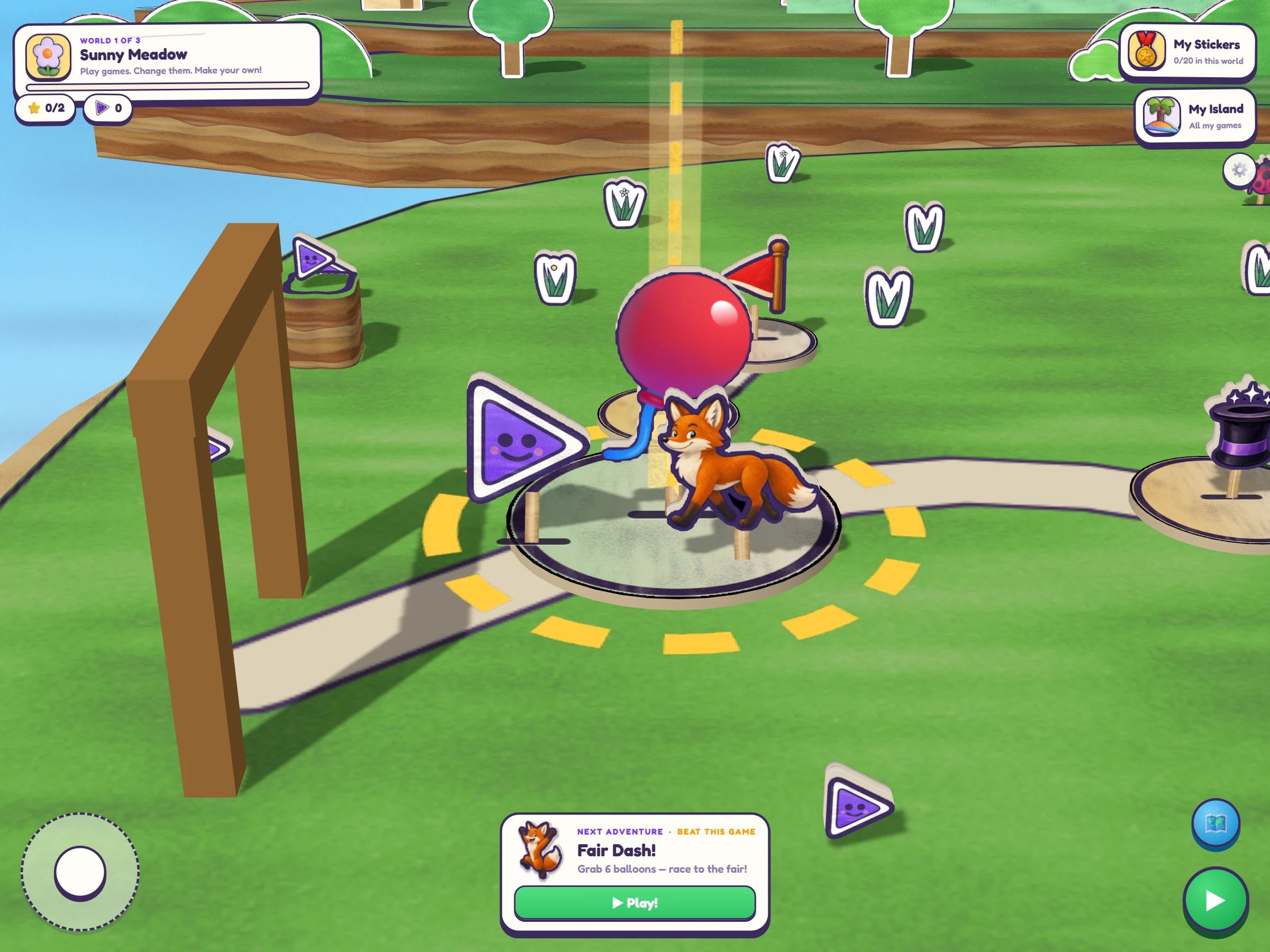
🚶 A world, not a menu. Kids steer their own hero to the next lesson. The motivation is in the map, not in your voice.
🎯 Every game states its win goal. "Catch 10 clouds." No teacher translation step, no reading wall.
🚩 Missions turn playing into making. Beat it, open it, change one rule, and it's theirs.
Watch a student think
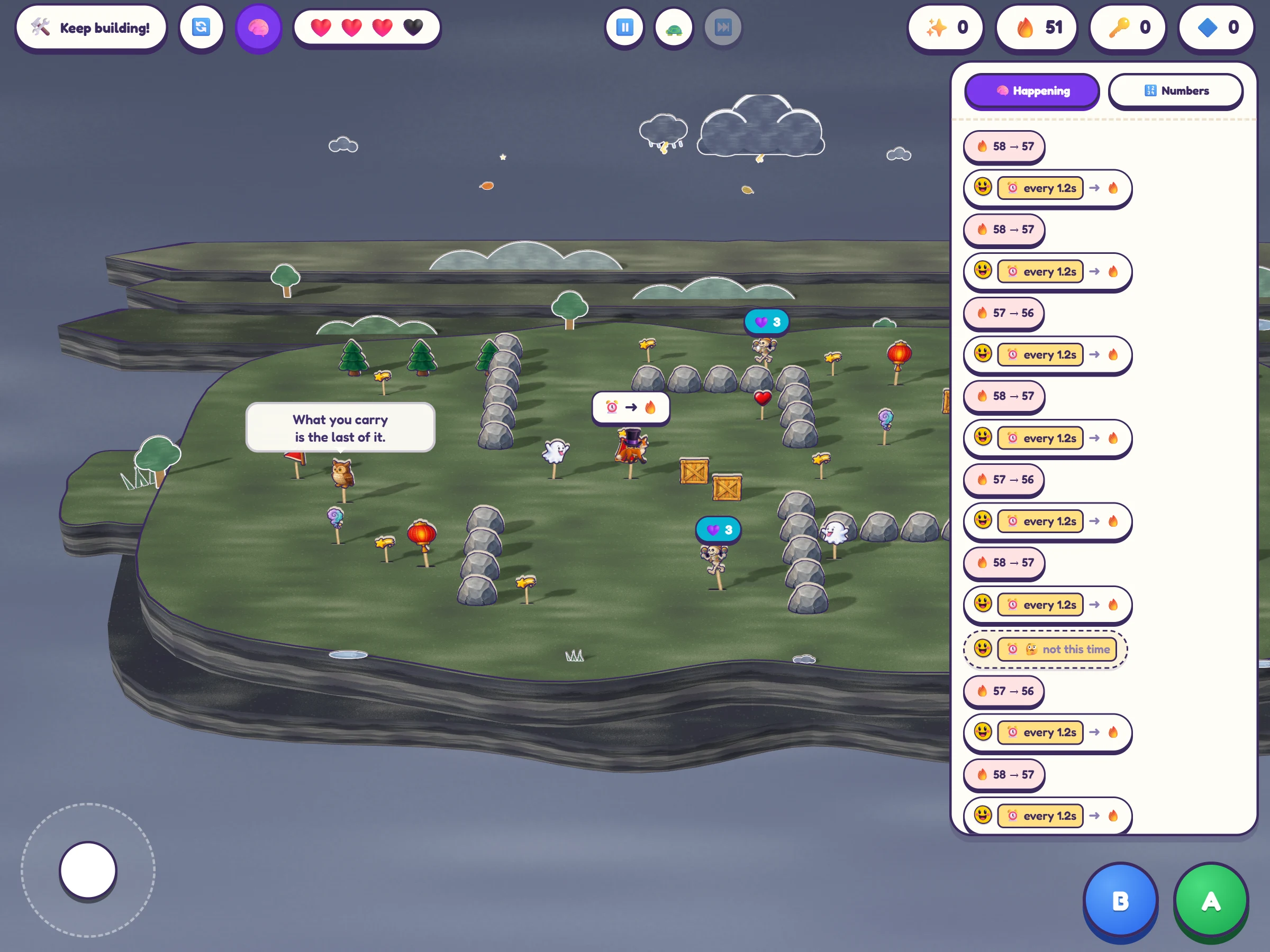
Brain view is a real debugger sized for a seven-year-old — and the most honest formative assessment we know of in a coding tool. You can see the reasoning, not just the finished thing.
⏸️ Pause the world mid-game and read every character's rules, frozen mid-thought.
🔦 Watch a WHEN light up the moment it's true — so you can see which rule the child expected to fire.
⏭️ Step one moment at a time when it doesn't. That conversation is the lesson.
They don't just make the game. They can explain it.
"What do I give the kid who finished ScratchJr?" is a question teachers ask every single year. The 6–9 band can't parse Scratch's dense palette yet — but they can absolutely reason about WHEN this happens → DO that. That band is where elementary CS actually lives.
Here today, honestly
The student half is real and shipping — you just played it. The teacher half is what pilots are for. We'd rather show you the line than blur it.
✅ Here today
- ✅ The full engine and 3D editor in any modern browser
- ✅ Three built worlds of games, missions and challenges
- ✅ Brain view: pause the game, slow it, step it
- ✅ No student accounts, no PII, no chat, no ads, no third-party trackers
- ✅ The consumer iPad app, live on the App Store
🔨 Built with pilots
- 🔨 Teacher dashboard: rosters, progress, one tap into any kid's game
- 🔨 Class-code sign-in with picture passwords — no student emails
- 🔨 The class-only arcade, teacher-approved before anything is shared
- 🔨 Google Classroom rostering, then Clever and ClassLink
- 🔨 Lesson plans, rubrics, printables, and the CSTA K–2 / 3–5 mapping
Raise your hand
Pilots are forming now that the consumer app is live: about ten hand-held classrooms, a free pilot year, and a standing call with us. Early pilots shape the teacher dashboard before it's built.
Questions before you forward this
How does this work with COPPA and FERPA?
Classroom runs on the school-consent model — the school acts as the parent's agent for educational use. The design does most of the work: no student emails, no real names, no photos, no chat, so there is very little to cover. Projects and progress are education records, and a DPA covers how we handle them. We'll sign the SDPC/NDPA national agreement before the first district conversation.
What devices does it need?
Any modern browser — Chromebooks, Windows laptops, Macs, iPads. Nothing to install and no plugin. The iPad app on the App Store is the consumer twin: same engine, same games, live today.
Scratch is free. Why would we pay?
Because the thing you'd be buying isn't the kid's tool — it's yours. Scratch has no rostering, no assignment flow, no progress visibility, and its public community is exactly what elementary schools block. Rostering, visibility, a scripted sequence a teacher with zero CS training can run on a Tuesday, a class-only arcade, and someone to call: that's the line item. And ScratchJr ends where Scratch begins in reading level, not age — the 6–9 band is the gap.
What does a pilot actually involve?
One class, a free pilot year, and about twenty minutes of us a week. You use it with kids, tell us what breaks and what's missing, and the teacher tools get built around your answers. We're taking roughly ten classrooms for the first round.
Do students need accounts?
Not today — the browser studio keeps a kid's games in that browser with no sign-in at all. Classroom rostering will be school-controlled: a class code and a picture password, never an email address typed by a six-year-old.
Does it work offline?
The iPad app is fully offline by design. The browser studio needs the network to load, then keeps the work in the browser. Offline-tolerant sync — queued writes for the cart wifi we all know — is on the Classroom build list, not done.